On this page
- What does it mean to train a chatbot on your data?
- Step 1: Decide what the chatbot should actually do
- Step 2: Collect and clean your knowledge base
- Step 3: Structure and index your content
- Step 4: Connect the model with retrieval and tools
- Step 5: Evaluate, monitor, and improve
- When should you go beyond basic RAG?
To train a chatbot on your data for support, you gather your documentation and FAQs, convert them into clean text chunks, index those chunks in a search-friendly store, and connect them to a language model that answers using the retrieved content. The quality of the bot depends more on how you structure and maintain your knowledge base than on which model you pick.
What does it mean to train a chatbot on your data?
Training a chatbot on your data means configuring an AI system so its answers are grounded in your own documents, policies, and past conversations instead of only its generic pre-training. In practice, this is usually done with retrieval‑augmented generation (RAG), not by fully retraining a model from scratch.
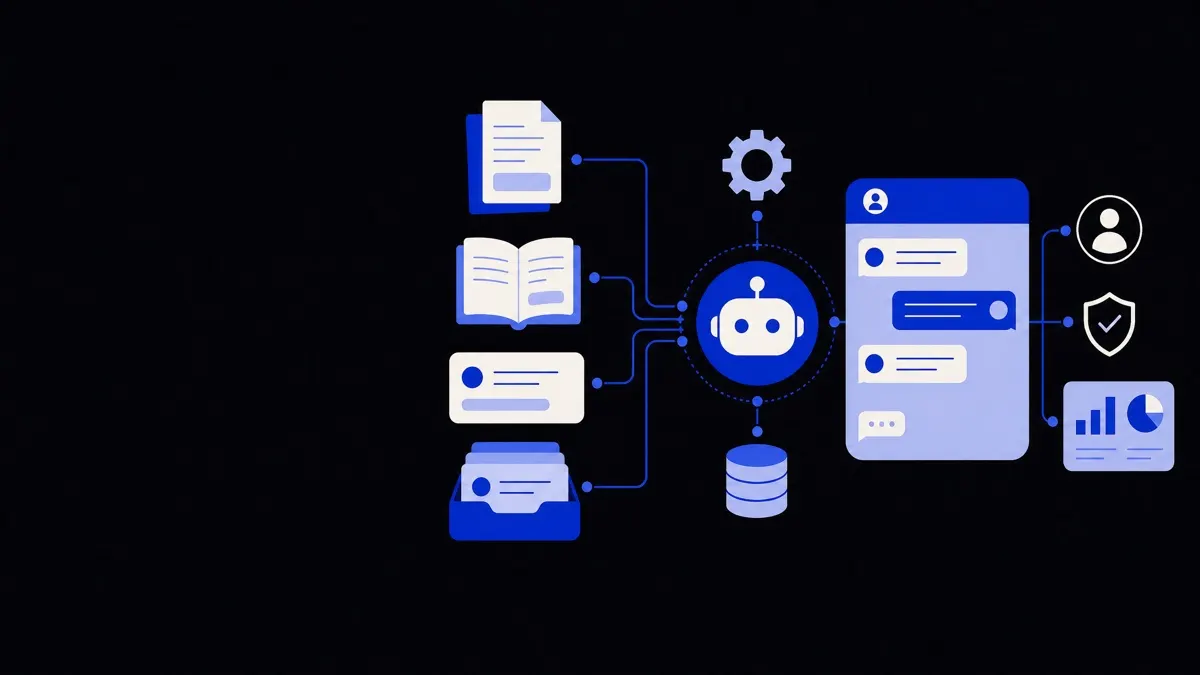
In a RAG setup, your content is stored in a searchable index, and at question time the chatbot:
- Searches your index for the most relevant content.
- Feeds that content into the model alongside the user’s question.
- Generates an answer that cites or stays aligned with the retrieved information.
This approach avoids the cost and risk of fine‑tuning while keeping your bot current with new docs. You can still fine‑tune for tone or domain style later, but most support chatbots work well with a carefully built RAG pipeline plus a strong base model.
For most support teams, better content structure and retrieval beat more complex model training.
Step 1: Decide what the chatbot should actually do
Before you train a chatbot on your data, you need a narrow, concrete scope. A tightly defined use case makes every technical decision easier and keeps expectations realistic.
Common support scopes include:
- Self‑service FAQs – order status, account changes, subscription questions.
- Product usage help – how‑to guides, feature explanations, troubleshooting.
- Internal support – internal IT, HR policies, process documentation.
- Tier‑1 triage – collect details, propose simple fixes, then hand off to humans.
Answer these questions early:
- Who is the primary user? Customers, internal staff, or partners.
- What channels will it live on? Website widget, in‑app, Slack, email, phone via voice agent.
- What must it not do? For example, no billing changes, no legal advice, no medical diagnosis.
- What tools can it safely call? Ticket creation, knowledge base search only, or also account lookups and updates.
Write down a one‑paragraph scope statement and a short list of “out of scope” topics. This text later becomes part of the system prompt that steers your bot’s behavior.
If you plan to expose the bot via voice, you can reuse almost the same backend and plug it into a voice layer like the ones described under AI chatbots and voice agents.
Step 2: Collect and clean your knowledge base
Your chatbot is only as good as the content you feed it. This step is unglamorous but critical.
What data should you include?
Prioritize:
- Help center articles and FAQs – usually your best‑structured content.
- Product manuals and onboarding guides – features, configuration, workflows.
- Internal runbooks – step‑by‑step procedures your support team uses.
- Recent resolved tickets or chat logs – real wording and edge cases.
- Policy documents – refunds, SLAs, privacy, security.
De‑prioritize or exclude:
- Old content you know is wrong or deprecated.
- Duplicate or near‑duplicate documents.
- Extremely long documents that mix many unrelated topics (split these up).
Avoid including:
- Raw personal data from tickets.
- Credentials, API keys, or secrets.
- Anything under legal hold or strict confidentiality unless you have strong access controls.
Data cleaning in practice
The goal of cleaning is to turn each source into consistent, readable text.
Typical tasks:
- Convert formats – export from your help desk or CMS as HTML or Markdown, convert PDFs and Word docs to text.
- Strip noise – nav menus, footers, cookie banners, internal comments.
- Normalize headings – ensure you have clear titles and section headings.
- Remove tracking fragments – unrelated query parameters and IDs in URLs or snippets.
For chat logs and tickets:
- Remove names, emails, phone numbers, IDs, and any sensitive text.
- Keep the problem description, relevant context, and final answer.
- Optionally tag examples by topic (billing, shipping, integrations) to help with evaluation later.
Clean data directly improves retrieval quality. It also makes it easier for future humans to audit what the bot is relying on.
Step 3: Structure and index your content
Clean text alone is not enough; you also need the right structure. The main design choice is how to split documents into chunks and how to index those chunks.
How to chunk your documents
Chunking is the process of splitting long content into smaller sections that can be retrieved independently.
Good chunks are:
- Short enough to fit several of them into a single model context.
- Complete enough to answer a specific type of question.
- Labeled with metadata (source, date, type, visibility).
Practical guidelines:
- Use headings or logical sections as boundaries when possible.
- Aim for around 200–500 words per chunk for support content.
- Keep procedural steps together so they are not split mid‑instruction.
- Store for each chunk:
- Source document title and URL.
- Section heading.
- Last updated timestamp.
- Audience (public vs internal).
- Tags like “billing”, “shipping”, “integration‑X”.
Well‑chunked content makes the retrieval step robust and understandable.
Choosing and building the index
Most modern setups use:
- Vector search – stores an embedding (numeric representation) of each chunk so the system can find content by meaning, not just exact keywords.
- Optional keyword search – classic search by words, often combined with vector scores to improve precision.
Key decisions:
- Embedding model – pick a model suited to your language and domain; larger is not always better if cost and latency matter.
- Index granularity – usually one embedding per chunk is enough for support use cases.
- Metadata filters – support search by product line, region, plan type, or internal/external status.
At this stage, you have a knowledge store that can answer “find me three chunks relevant to this question” reliably. That store is what you will “train” the chatbot on.
Step 4: Connect the model with retrieval and tools
Now you combine your index with a language model and define how answers should be produced.
The core RAG pipeline
A typical question‑answer cycle:
- User sends a question.
- Pre‑processing (optional):
- Detect language.
- Extract entities like product name or plan.
- Retrieve relevant chunks:
- Convert question to an embedding.
- Search the vector index, apply filters if needed.
- Pick the top N chunks (for example, 3–8).
- Build the prompt:
- System message with role, scope, and tone.
- User question.
- Retrieved chunks as reference material.
- Instructions about quoting and what to do if content is missing.
- Generate an answer:
- The model responds using only the retrieved information as ground truth.
- Post‑processing:
- Add suggested links or article references.
- Apply safety filters or redaction checks if required.
- Decide whether to escalate to a human.
Good system instructions are as important as the model choice. Examples of stable instructions:
- Always say when the knowledge base does not contain an answer.
- Prefer step‑by‑step instructions over long paragraphs.
- Never fabricate order details, account data, or prices.
- For policy questions, quote the exact text when possible.
Tools and integrations
Beyond pure question‑answering, your chatbot can call tools. A tool is any API or function the bot can ask the backend to run.
Safe starting tools for support bots:
- Create a ticket in your help desk system with the conversation attached.
- Look up order status by order ID (never expose more than needed).
- Search your knowledge base with advanced filters.
- Route to a human and pass conversation context.
Add tools slowly and test each one with clear rules:
- What inputs are allowed.
- When the tool should be used or avoided.
- What to do if the tool fails (for example, “I could not access your order; let me connect you to a person”).
If you are building both a chat and voice channel, you can share the same retrieval and tool layer and only change the interaction front‑end, which is exactly how many AI chatbots and voice agents are structured.
Step 5: Evaluate, monitor, and improve
Training a chatbot on your data is never “set and forget.” The feedback loop is part of the system.
How to evaluate quality
Use a mix of manual review and lightweight metrics.
Start with a small evaluation set:
- Collect 30–100 real questions from users and support agents.
- For each, define:
- An ideal answer or key points.
- One or more relevant source articles.
- Run them through your bot and score answers on:
- Correctness – factually aligned with your docs.
- Helpfulness – actually solves the user’s problem.
- Grounding – can you trace each important claim to a source chunk.
Have at least two reviewers spot‑check answers, especially in higher‑risk domains like finance or healthcare.
Operational metrics to track over time:
- Containment rate – how many conversations are resolved without human intervention.
- Escalation reasons – missing content vs poor reasoning vs tool limits.
- Common “I don’t know” topics – these signal documentation gaps.
- Average response length – too long can be as bad as too short.
Updating and governing your knowledge base
Your chatbot is only as current as its index. Define simple processes:
- Content lifecycle:
- When a policy or feature changes, who updates the document?
- How quickly does the new version get re‑indexed?
- Access control:
- Separate indexes for public and internal content.
- Role‑based access so internal users can see more detailed answers.
- Versioning:
- Track which document version each chunk came from.
- Allow rollbacks if you discover incorrect content.
A lightweight governance checklist:
- New products and major features must have at least one plain‑language article.
- Every new macro or saved reply used by agents for a month graduates into a knowledge article.
- The chatbot’s “unanswered” queries list is reviewed weekly, and high‑volume gaps become new docs.
Even a simple monthly review cycle significantly improves answer quality without touching the underlying model.
When should you go beyond basic RAG?
Most support teams do not need to retrain or fine‑tune a model to train a chatbot on your data. However, there are cases where going further is useful.
Scenarios where extra training can help:
- Highly specialized jargon – the base model struggles to interpret your domain terms correctly.
- Strict formatting – responses must follow specific templates, tables, or structured JSON for downstream systems.
- Subtle policy logic – many exceptions and cross‑dependencies that are hard to express in a simple prompt.
Options, from lighter to heavier:
- Prompt engineering and guardrails – refine instructions, add examples, and apply policy filters.
- Response templates – structure the model output into fixed sections (summary, steps, warnings).
- Fine‑tuning – train the model on examples of your own best answers to shift style and domain behavior.
- Hybrid search – combine rules‑based routing, keyword search, and vector search for complex knowledge graphs.
These steps add complexity and operational load. Evaluate them only after you have:
- Clean, well‑structured content.
- A solid retrieval index.
- Real usage data showing consistent failure patterns that prompt changes alone cannot fix.
If you reach this stage and need a deeper architecture review or custom integrations with CRMs, ERPs, or ticketing systems, it may be worth involving specialists who build and operate AI chatbots and voice agents for support workflows on a regular basis.